⏱️ 20 minutes · Requires Guides 1-5 · Tested on macOS (Apple Silicon) + iPhone (Safari, Termius, Shortcuts)
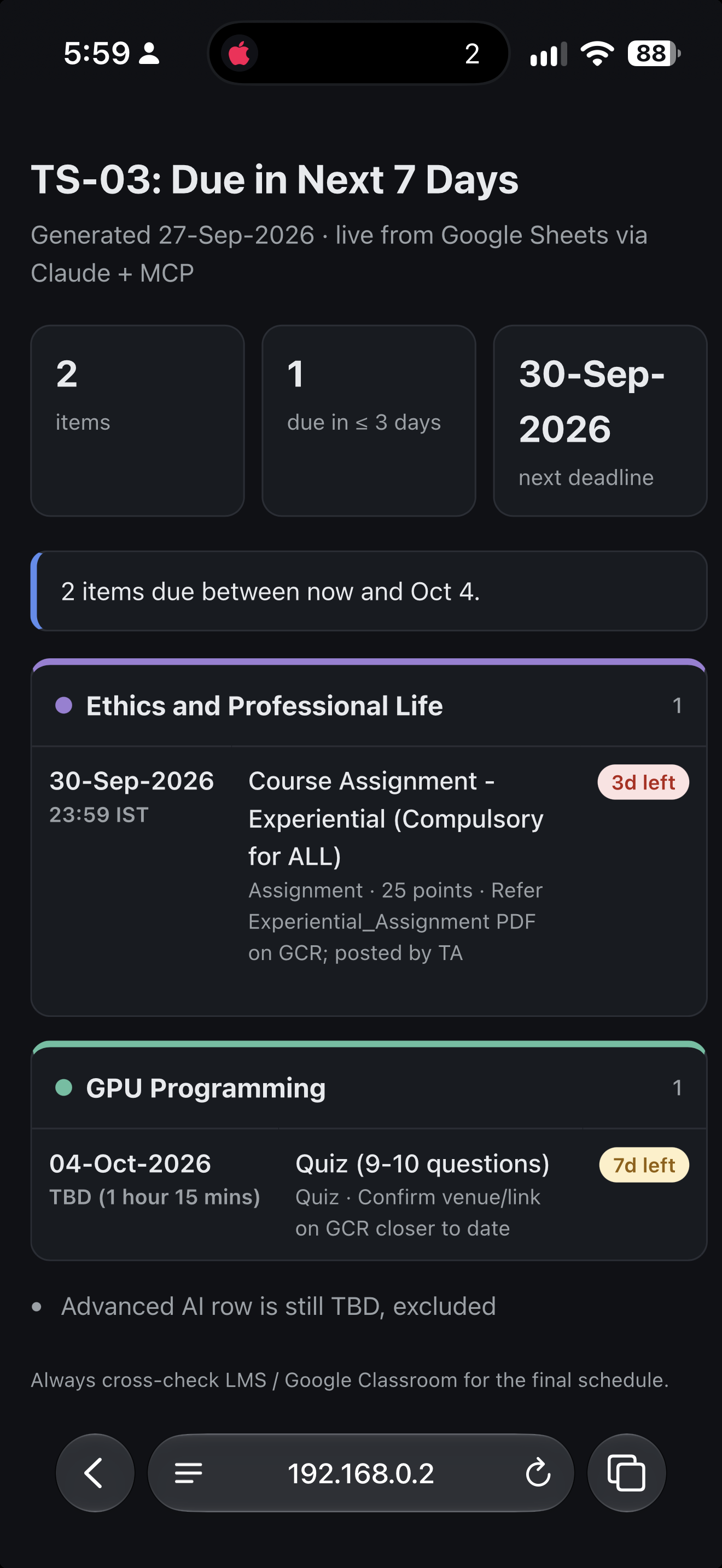
What you're building
Why JSON first? Asking Claude directly for "a table" gives slightly different markdown every time. Asking for a fixed JSON shape and rendering it locally gives the same layout on every run, in every format.
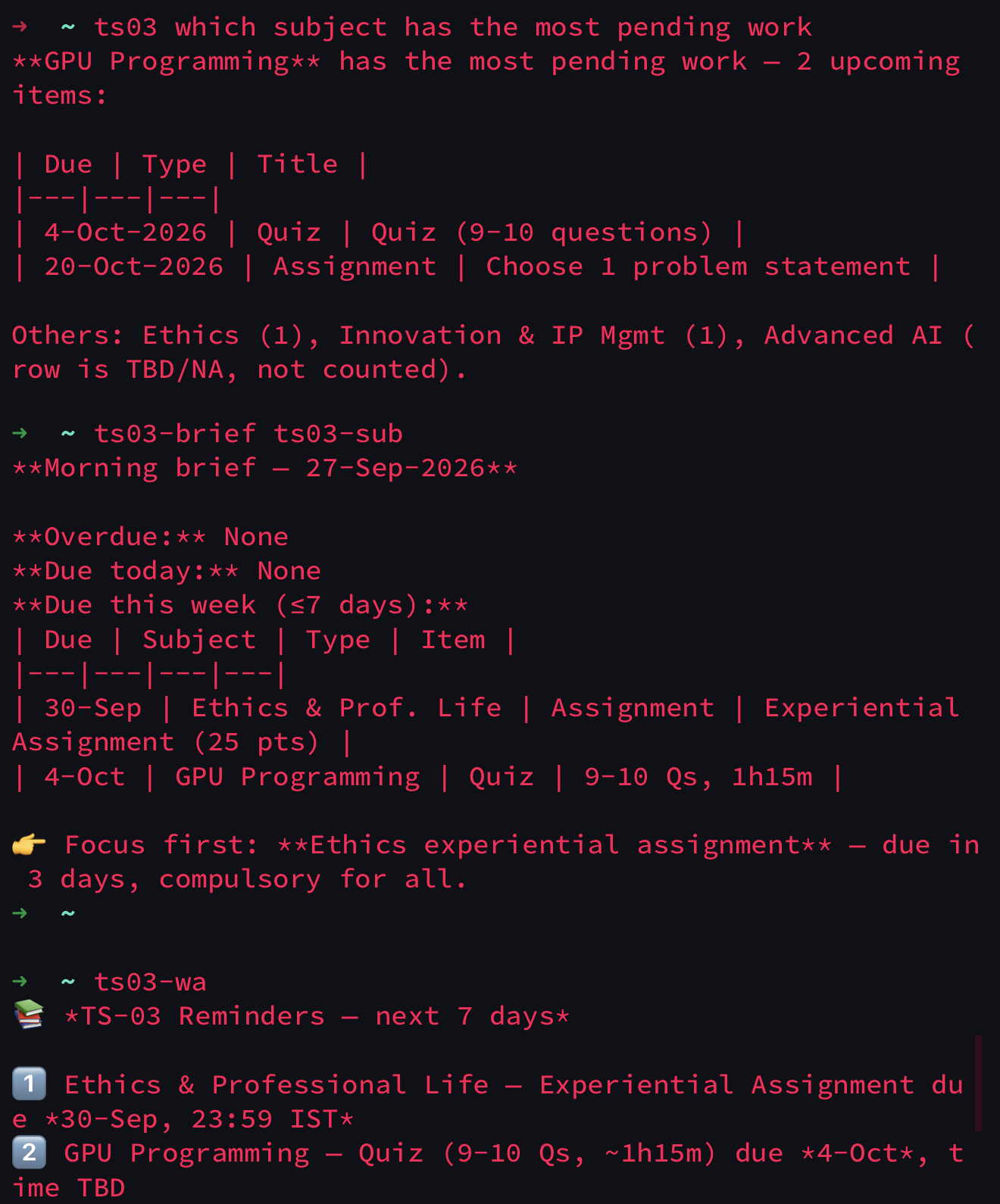
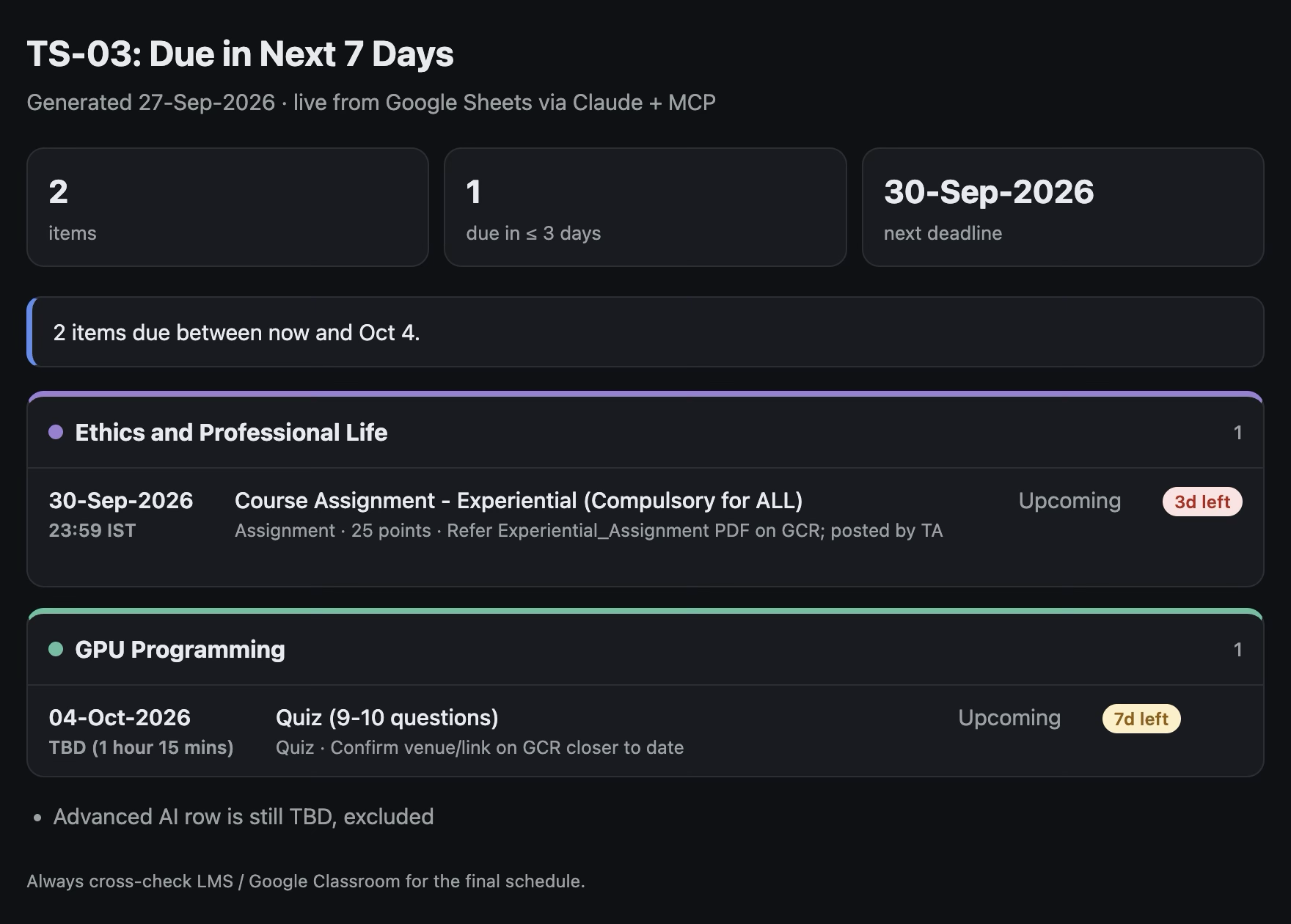
Real output (built and tested)
Mac terminal: plain ts03 answers
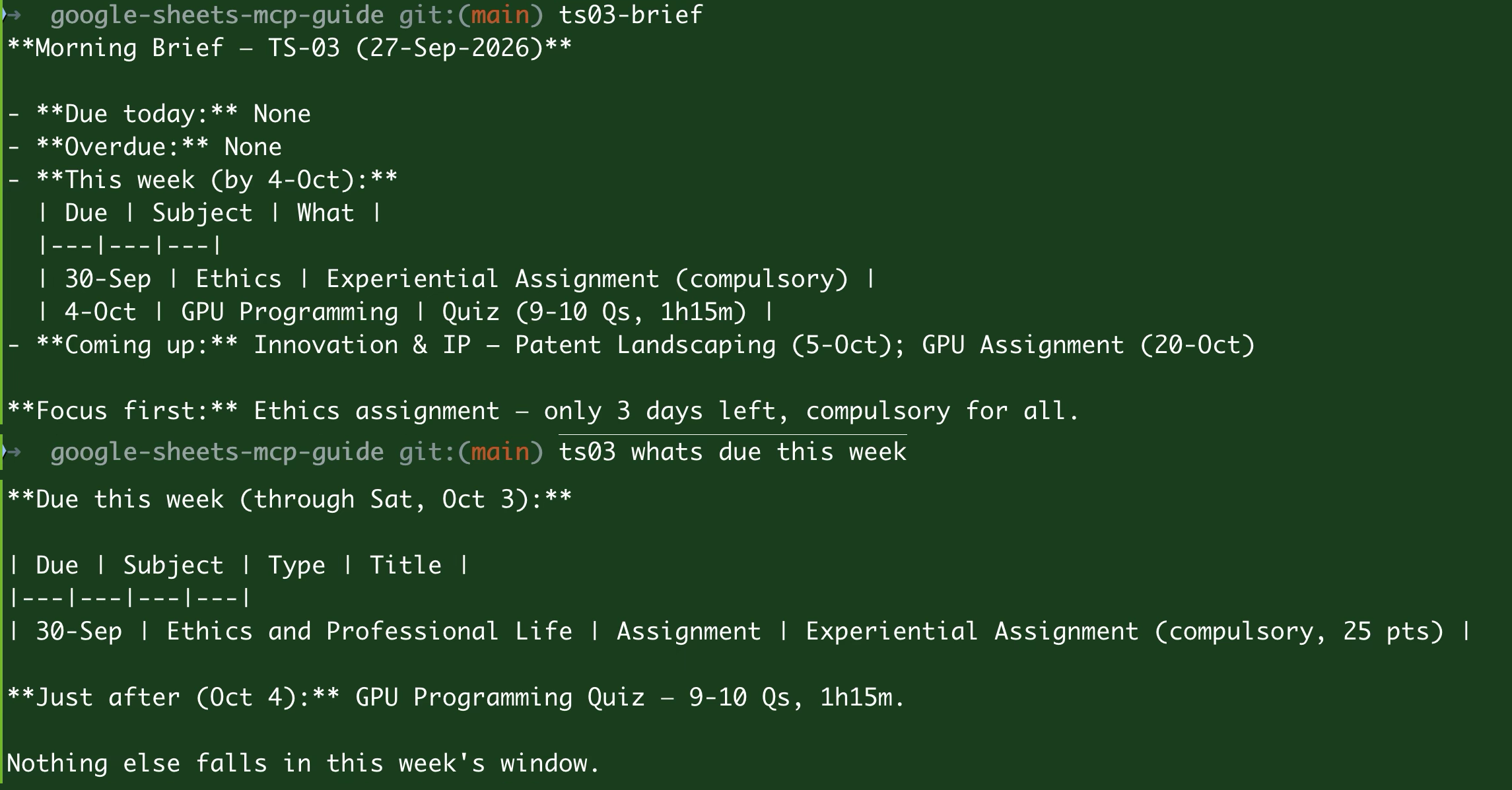
iPhone, Termius over SSH: same commands from the phone
HTML report in a Mac browser (ts03-week --html)
Part A · Mac setup
0Clone the repo
git clone https://github.com/rpaut03l/google-sheets-mcp-guide.git
cd google-sheets-mcp-guide
Guides 1-4 must be done first: claude mcp list shows google-sheets ✔ Connected and ts03-brief works.
1Install the renderer
mkdir -p ~/.local/bin
cp scripts/ts03-render ~/.local/bin/ts03-render
chmod +x ~/.local/bin/ts03-render
type ts03-render
✅ ts03-render is /Users/YOUR_USERNAME/.local/bin/ts03-render
What it does (scripts/ts03-render, ~200 lines, Python standard library only):
| Stage | Detail |
|---|---|
| Parse | Finds the JSON object in Claude's reply (even if wrapped in code fences). Clear error if none. |
| Sort | Items by due_date, then time |
| Render | table: aligned columns · text: grouped per subject · json: pretty-printed · yaml: no extra libraries · html: styled page |
| HTML | Summary cards (total, ≤ 3 days, next deadline), one card per subject in legend colours, days-left badges (red ≤ 3, amber ≤ 7, green), light/dark mode, phone-friendly |
| Save | ~/ts03-reports/ts03-YYYYMMDD-HHMMSS.html + ~/ts03-reports/latest.html |
| Open | Opens in your browser on the Mac; over SSH it only saves (no screen there) |
2Add format support to ~/.zshrc
Append after the command pack from Guide 4:
cat templates/zshrc-formats.sh >> ~/.zshrc
Set the address your iPhone will use. First get your Mac's local name:
scutil --get LocalHostName
Then edit the line in ~/.zshrc (replace Your-MacBook.local with <that-name>.local):
nano ~/.zshrc          # find: export TS03_HOST="Your-MacBook.local"
source ~/.zshrc
type ts03 ts03-link
What it adds (templates/zshrc-formats.sh):
ts03() {
  local fmt="${TS03_FORMAT:-}"
  case "$1" in --table|--text|--json|--yaml|--html) fmt="${1#--}"; shift ;; esac
  case "${@[-1]}" in --table|--text|--json|--yaml|--html) fmt="${@[-1]#--}"; set -- "${@[1,-2]}" ;; esac
  if [[ -z "$fmt" ]]; then claude -p --model sonnet "TS-03 tracker: $*"; return; fi
  local schema='Reply with ONLY one JSON object ... {"title", "generated_on", "answer", "items": [...], "notes"}'
  claude -p --model sonnet "TS-03 tracker: $*

$schema" | ts03-render --format "$fmt"
}
export TS03_HOST="Your-MacBook.local"
alias ts03-link='echo "http://$TS03_HOST:8765/latest.html"'
alias ts03-server='launchctl list | grep ts03; lsof -nP -iTCP:8765 -sTCP:LISTEN'
- No flag → same answer as before.
- Flag at the start or end → every existing alias gains formats:
ts03-week --html,ts03-sub GPU Programming --text. TS03_FORMAT=table→ default format for the session.
3Try every format
ts03-week --table
ts03-week --text
ts03-week --json
ts03-week --yaml
ts03-week --html
| Flag | Best for |
|---|---|
| (none) | Quick conversational answer |
--table |
Scanning deadlines in a terminal |
--text |
Reading on a phone: one subject per block, one item per line |
--json |
Scripts, jq, dashboards |
--yaml |
Config-style reading, pasting into notes |
--html |
Sharing / viewing on iPhone |
Examples:
ts03 --html list all upcoming items
ts03-sub GPU Programming --text
ts03-month --json | jq '.items[] | {subject, due_date, days_left}'
Formatted output adds a JSON step, so it's 1-2 seconds slower than plain ts03. Non-list questions ("who teaches X") work best without a flag.
4Start the always-on report server
scripts/install-report-server.sh
Expected:
✅ com.ts03.reports running on port 8765
   iPhone (same Wi-Fi): http://Your-MacBook.local:8765/latest.html
   or by IP:            http://192.168.x.x:8765/latest.html
What the script does (scripts/install-report-server.sh):
1. Creates ~/ts03-reports/
2. Finds the real Python binary (not the /usr/bin/python3 shim, which can fail under launchd)
3. Refuses to install if something else already holds port 8765 (tells you the PID)
4. Writes ~/Library/LaunchAgents/com.ts03.reports.plist (reference copy: templates/com.ts03.reports.plist.example)
5. Loads it with launchctl, verifies it's running, prints the URLs
If macOS asks whether Python may accept incoming connections: Allow.
Verify any time:
ts03-server
curl -sI "$(ts03-link)" | head -1
✅ launchctl shows a number (PID) in the first column, lsof shows the same PID on *:8765, curl returns HTTP/1.0 200 OK.
Uninstall: scripts/install-report-server.sh --uninstall
5Check the link helper
ts03-week --html
ts03-link
✅ Prints http://Your-MacBook.local:8765/latest.html
Tested tip: if .local doesn't open on the iPhone, use the IP instead. Get it with ipconfig getifaddr en0 and set export TS03_HOST="192.168.x.x" in ~/.zshrc. (Home routers may hand out a new IP after a restart; reserve it in the router's DHCP settings if that happens.)
6Keep the Mac reachable
System Settings → Battery → Options: - Prevent automatic sleeping on power adapter when the display is off: ON - Wake for network access: ON
Part B · iPhone setup
7Network
- iPhone on the same Wi-Fi as the Mac
- Privacy VPN off (ExpressVPN, NordVPN, ... block local network access)
- If it still fails: Wi-Fi → ⓘ → Limit IP Address Tracking: off, or turn off iCloud Private Relay for this network
8Local Network permissions
Settings → Privacy & Security → Local Network → enable Termius (and Shortcuts once it appears).
- Safari never appears in this list. It's a built-in app and doesn't need it.
- Shortcuts appears only after it first tries to reach the Mac. Tap Allow on that prompt.
9Open the report
Safari:
http://Your-MacBook.local:8765/latest.html
or http://192.168.x.x:8765/latest.html.
http://, not https://.
10Add to Home Screen
Safari → Share → Add to Home Screen → name it "TS-03". It always shows the newest report.
11Generate a fresh report from Termius
ts03-week --html && ts03-link
Tap the printed link. Termius makes URLs tappable.
12One-tap Shortcut (refresh + open)
Shortcuts app → + → add three actions:
1. Run Script over SSH
| Field | Value |
|---|---|
| Host | Your-MacBook.local (or the IP) |
| Port | 22 |
| User | your Mac short username (whoami) |
| Authentication | SSH Key |
| Script | source ~/.zshrc >/dev/null 2>&1; ts03-week --html >/dev/null 2>&1; ts03-link |
2. Get URLs from Input → input: Shell Script Result
3. Open URLs
Authorize the Shortcut's key: tap the SSH Key field → Share Public Key → copy → on the Mac:
nano ~/.ssh/authorized_keys # paste as a new line, save
Name it Tracker Week → Add to Home Screen → Add to Siri ("tracker week"). First run: allow the SSH connection and Local Network access. A fresh report opens in ~10-20 seconds.
One Shortcut, several reports: start with Choose from Menu and use a different script per option:
| Option | Script |
|---|---|
| Week | source ~/.zshrc >/dev/null 2>&1; ts03-week --html >/dev/null 2>&1; ts03-link |
| Brief | source ~/.zshrc >/dev/null 2>&1; ts03-brief --html >/dev/null 2>&1; ts03-link |
| Month | source ~/.zshrc >/dev/null 2>&1; ts03-month --html >/dev/null 2>&1; ts03-link |
| Urgent | source ~/.zshrc >/dev/null 2>&1; ts03-urgent --html >/dev/null 2>&1; ts03-link |
Then Get URLs from Input → Open URLs.
Troubleshooting (real issues hit while building this)
| Symptom | Cause | Fix |
|---|---|---|
ts03-serve: command not found / old commands in Termius |
Session opened before ~/.zshrc changed |
source ~/.zshrc (or open a new tab) |
launchctl list shows - 78 com.ts03.reports |
Service not running; port 8765 held by a manually started server | lsof -nP -iTCP:8765 -sTCP:LISTEN → kill <PID> → re-run the installer |
curl works but service shows - |
You're hitting the manual server, which dies when its tab closes | Same as above |
| Service exits under launchd | /usr/bin/python3 shim |
Installer uses sys.executable; re-run it |
ts03-render: no JSON in Claude's reply |
Question isn't list-shaped | Run it without a flag |
| Safari "can't connect" | Different Wi-Fi, VPN on, Mac asleep | Step 7 and Step 6 |
.local name doesn't resolve |
mDNS blocked on network | Use ipconfig getifaddr en0 IP |
| Safari missing from Local Network list | Normal | Nothing to do |
| Shortcut: permission denied | Its key isn't authorized | Add its public key to ~/.ssh/authorized_keys |
| Old report shows | Cached | Pull to refresh; ls -lt ~/ts03-reports \| head |
Server log: cat /tmp/ts03-reports.log
Security and housekeeping
- The server binds to
0.0.0.0, so anyone on the same Wi-Fi can openhttp://<mac>:8765/. Fine at home. On shared Wi-Fi (office, café, hostel):bash launchctl unload ~/Library/LaunchAgents/com.ts03.reports.plist # stop launchctl load ~/Library/LaunchAgents/com.ts03.reports.plist # start again at home - It serves only
~/ts03-reports/. Don't put anything else there. - Away-from-home access: add a mesh VPN (Guide 6) and use its address as
TS03_HOST. - Clean old reports monthly:
bash find ~/ts03-reports -name 'ts03-*.html' -mtime +30 -delete - Screenshots you share: crop out local paths, hostnames and people's names (the ones in this guide were redacted).
Files added by this guide
| File | Purpose |
|---|---|
scripts/ts03-render |
JSON → table / text / json / yaml / html |
scripts/install-report-server.sh |
Install / uninstall the launchd report server |
templates/zshrc-formats.sh |
ts03 with format flags, TS03_HOST, ts03-link, ts03-server |
templates/com.ts03.reports.plist.example |
Reference launchd config |
docs/images/*.png |
Real screenshots from Mac and iPhone |
⬅️ Back to README
Questions or corrections: [email protected]